We Are Excited to Announce the Release of NSPanel Pro v4.2.0!
Dear NSPanel Pro users,
Thank you for your ongoing attention and discussions. We are pleased to announce that the NSPanel Pro V4.2.0 firmware has been officially released. This update represents the second major version as committed in the [NSPanel Pro] product roadmap, and we have delivered the planned core functional expansion on schedule.
This release is two days later than the originally announced date, for which we sincerely apologize. The team conducted additional verification to ensure the integrity of the update content and smooth deployment. Thank you for your patience.
New Features Overview
Core features:
- Matter Bridge chapter 2
- Always auto-start on system boot
This release implements the features outlined in our product roadmap. Please refer to NSPanel Pro Roadmap and Co-Created Future - NSPanel Pro - eWeLink Forum for more details.
Additional Features:
In addition to the core Matter Bridge capability expansion, this update also includes a series of native experience improvements:
- Apps Screen and App Switcher:Switch between installed apps more efficiently.
- Set “Home App”:Set your preferred app as the default home screen.
- Control Visibility of “Accessibility Button”: Simplify the interface based on preference.
- Expanded Zigbee Device Support,including:
SONOFF SNZB-02DR2
SONOFF MINI-ZBDIM MINI
SONOFF MINI-DIM MINI
SONOFF CAM-B1P
SONOFF SNZB-01M
Them are new SONOFF products which are coming soon, stay tuned!
Note 1: The above features work with eWeLink App v5.22.0 and above.
Bugfix:
Several known issues have been solved.
Detailed Operation Tutorials
To help you quickly get started with the new features, we’ve provided detailed step-by-step guides for each major feature, including both eWeLink App and NSPanel Pro screen operations. Please ensure your NSPanel Pro has been upgraded to v4.2.0.
Note: v4.2.0 is a beta release for selected devices. If you would like to experience the latest features, please join through the NSPanel Pro v4.xx Beta Test Application Tool.
Tutorial: Bridging WiFi Devices to Matter (Chapter 2)
According to the product roadmap already released to the community,following the successful synchronization of Zigbee sub-devices into the Matter ecosystem in V4.1.0, the core mission of this V4.2.0 version is now complete.
Matter Bridge now supports syncing eligible Wi-Fi devices linked to the same eWeLink account as NSPanel Pro to the added Matter platforms for control.
App Operation Steps: :
-
Ensure your App version is on
V5.22.0and above. -
Go to
NSPanel Pro> Settings > Matter Bridge.

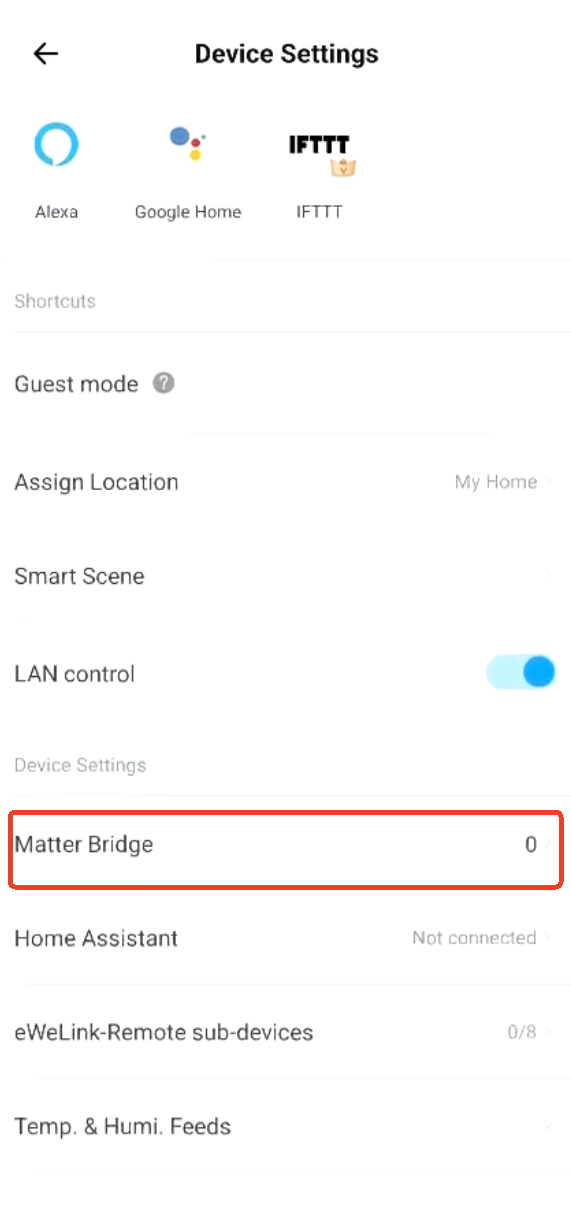
Note: If you have not yet synchronized your NSPanel Pro to Matter ecosystems, please click the “+” icon in the top-right corner to put NSPanel Pro into Matter Bridge pairing mode and complete the addition process before proceeding with the device selection steps below. For detailed instructions, please refer to: Matter Bridge Guide
Please refer to NSPanel Pro v4.1.0 Release: New Features & Enhancements - NSPanel Pro - eWeLink Forum for more details.
- Tap
Sync Bridged Devices > Edit → Select devices > Save.Both Zigbee and Wi-Fi devices are supported.
After successful synchronization, you can check the sync status in the app and control the devices on the Matter platform.

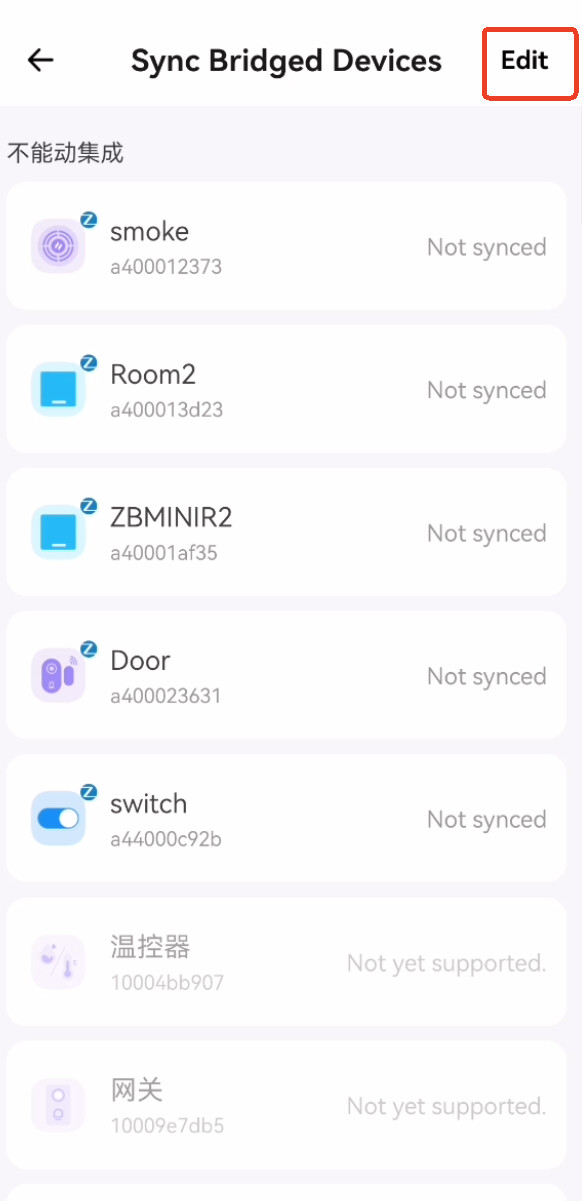

NSPanel Pro Screen Operation Steps:
Operation is not currently supported.
Tutorial:Apps Screen and App Switcher
Added an “Apps” menu item in the dropdown menu,There will to list all the apps you installed through F-Droid or adb. You can tap on the icon of an app to launch (open) it. If you have multiple apps running at the same time, you can use App Switcher to quickly switch between them.
App Operation Steps:
Settings are not currently supported via the App.
NSPanel Pro Screen Operation Steps:
Pull down the menu, then navigate to - > Apps


This menu will list all applications you have installed via F-Droid or ADB.You can tap an app’s icon to launch (open) it. If you have multiple apps running simultaneously, you can use the App Switcher to quickly switch between them.
Tutorial:Setting the “Home” App
Designate a preferred app (e.g., Home Assistant) as the default Launcher.
App Operation Steps:
Settings are not currently supported via the App.
NSPanel Pro Screen Operation Steps:
Pull down the menu, then go to Apps > Home App > Available Apps. Choose the app you want to see first.

Tutorial:Always Auto-Start on System Boot
When setting another application as the Launcher, the NSPanel Pro App now supports persistent background activity.
For example: When you set Home Assistant as the Home App, NSPanel Pro will keep running in the background, allowing Smart Scenes & Smart Security features to trigger and execute normally.
Note:This feature runs automatically and requires no user operation.
Tutorial D: Control Visibility of “Accessibility Button”
App Operation Steps:
Go to NSPanel Pro > Settings,find the “Accessibility Button” option,and toggle it on or off.
NSPanel Pro Screen Operation Steps:
Pull down the menu, then navigate to Apps > Home App > Accessibility Button. Toggle the “Accessibility Button” setting there.

Bug Fixes & Gratitude
In the v4.2.0 release, we’ve fixed several issues reported in the community forums. Special thanks to users who provided valuable feedback on our community forum. Their reports helped us quickly identify and resolve these issues. Below are some of the fixed bugs with their respective feedback links:
-
*Optimized the issue of “leading zero when displaying in 12-hour format”.
-
*Optimized the date format display for certain languages when the screen saver is activated.
We sincerely thank all users who reported issues! If you encounter any new problems after upgrading, please feel free to post in the forum or contact our support team. Your feedback is the driving force behind our progress.
Conclusion
The V4.2.0 firmware update marks a significant step forward for your NSPanel Pro. This release is dedicated to enhancing two key aspects:Enhanced Cross-Platform Integration and Upgraded Native Experience.
This release is designed to make your NSPanel Pro more powerful and better aligned with your unique smart home setup. We encourage you to upgrade and explore the new possibilities.
Please upgrade now to experience the new features! If you have any questions during the upgrade process, feel free to discuss in this forum topic or provide feedback to us.
Thank you once again for your continued support. Let’s continue building a smarter home, together.
— The NSPanel Pro Team
 Be the First to Experience and Win Discounts!
Now that you’ve learned about the latest features, we invite you to go a step further.
We’ve just launched an NSPanel Pro new feature experience-sharing event! Come and join us to win amazing prizes, including a triple combo gift pack!
Click the link below to get started now!
 Join the NSPanel Pro New Feature Experience Survey Now, Share Your Insights, and Win Zigbee Sensor! - Ideas & Suggestion - eWeLink Forum
Note: This community activity is an extension of our gratitude for your ongoing support.

 , it’s ok. However, now it no longer sees the updated to .

