salve a tutti….. mi chiamo Alessandro e sono nuovo, vorrei capire se è possibile se ho eseguito correttamente le configurazioni:
Ho installato un NSPanel120PB delle sonde termostato, delle valvole motorizzate TRVZB-01 e un accoppiatore ZBBridge-P.
Il mio dobbio sorge; nel fatto che non riesco a capire se ho creato una rete zigbee in modo corretto, cioè se i vari dispositivi zigbee dialogano tra di loro in modo che creino una rete, per creare appunto una rete se Nspanel l’ho configurato correttamente….
Un’altra cosa non riesco dal Nspanel gestire le temperature una volta configurate le sonde termostato…. Posso solo farlo dall’ App
Hi, thank you for using the NSPanel Pro. I’m not entirely sure which step you’re currently having trouble with, so allow me to briefly outline the setup process (you might find more detailed instructions in the user manual):
Preliminary Setup: If you’re using it with eWeLink, you first need to add the NSPanel Pro to the eWeLink app. After your device powers on, it will likely prompt you for some initial settings like language and region… then you should see a QR code. Use the eWeLink app to scan the code and add the device.
Getting Started with NSPanel Pro: I noticed you mentioned the TRVZB. This is a Zigbee device, which you can add directly under the NSPanel Pro. First, put the TRV device into pairing mode as described in its manual. Then, on the NSPanel Pro, swipe down → select “Add Device” → “Start Pairing”. Wait for the NSPanel Pro to scan and add the TRV (keep the two devices close together during this process). Once added, the TRV should appear on the screen automatically, indicating a successful Zigbee connection. You can long-press the device card to access its control page.
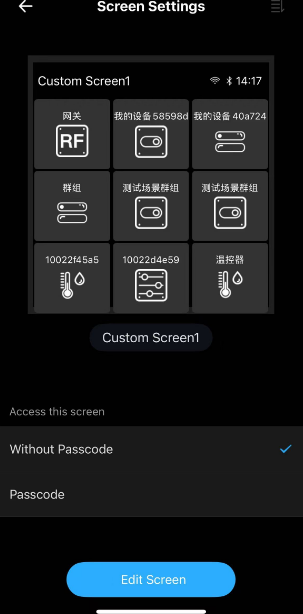
Alternative Method (if TRV is already in ZBBridge-P): If your TRV is already added to a ZBBridge-P, you can go to the NSPanel Pro settings within the eWeLink app → find “Screens” → edit the screen layout, and select the TRV device to sync it to the NSPanel. Similarly, you can then long-press the device card on the NSPanel Pro to control it.