iHost V2.8.1 Patch Released – Bug fixes for v2.8.0
We have released Patch V2.8.1 to resolve several issues from V2.8.0.
Bug Fix:
Fixed Matter Bridge issues:
Fixed an issue where the Matter Bridge repeatedly went offline.
Fixed a problem where adding more than 10 devices prevented newly added devices from being synchronized through Matter Bridge.
Fixed an issue where the Matter Fabric displayed as empty.
Fixed an issue where deleting a device from iHost did not correctly remove the corresponding device from the third-party Matter platform.
Fixed SONOFF TRVZB issues:
Fixed an issue where Boost Mode and Temp. Override Mode failed to execute correctly.
Fixed an issue where scene actions incorrectly allowed selecting Temp. Override Mode.
Fixed an issue where adjusting the Boost Time while in Boost Mode caused inconsistent or incorrect timing.
Fixed a bug where minute-level data of temperature and humidity graphs could not be properly displayed.
Fixed an issue where the target temperature displayed in CAST exceeded the allowed range.
Fixed an issue where the TRV’s target temperature for Boost/Temp. Override Mode could not be synchronized or displayed correctly.
V2.8.0 [2025/11/12]
iHost V2.8.0 Now Officially Released
This update broadens Matter Bridge and eWeLink Smart Home Add-on compatibilities, introduces new features for SONOFF TRVZB, improves scene management, and enhances overall user experience.
Please take a moment to read through the notes before updating to this version.
Optimizations:
Added support for syncing additional Matter-defined device types via Matter Bridge, including:
Light Sensor
Smoke CO Alarm (covering smoke and carbon monoxide sensors)
Air Quality Sensor
Room Air-conditioner
Fan
Added two new temporary modes for SONOFF TRVZB:
Boost Mode – heats the room quickly for a short period.
Temp. Override Mode – temporarily maintains a set temperature.
Introduced Labels – easily create custom labels and assign scenes to existing labels.
ONVIF-compatible cameras now support using “Motion Detected” and “Occupancy Detected” as scene triggers.
Expanded support for syncing eligible devices to iHost via eWeLink Smart Home Add-on, including:
SONOFF Mini-RBS
Virtual Devices (covering switches and buttons)
Sub-devices from ZBBridge-U:
SONOFF S60ZB
SONOFF SNZB-02LD/SNZB-02WD
SONOFF Mini-ZBRBS
SONOFF SWV
You can now hide offline devices from the Home page device list for a cleaner, more focused view.
Temperature and humidity graphs now support minute-level data for more detailed insights.
Bug Fix:
Fixed an issue where scene notifications were not received via CUBE CAST during remote access.
Fixed compatibility issues with Tuya TS0001_fingerbot.
Hi, I updated to 2.8 today, I made a manual backup and R5 still doesn't work, I saved the LOG file 76Mb, should I send it all or just a part of it, if I need it all I can send it as a maximum drive link.

I attached it, maybe I can send it that way.

Regards.
Aynnas
Was hoping to find in 2.8 some new devices coming across in the Matter bridge from my iHost.
So far no new smoke/light sensors (virtual) found. No longer bridged to my Homekit and Smartthings hubs 4 Tuya motion sensors that worked till now. Oh well🤷♂️
Thank you team for this update and for the update to ver 1.4.0 for TRVZB. Few points to bring to your attention:
It is still difficult to reliably change the TRVZB valve open and close % value (applies to using Chrome and Firefox browsers- Windows11 and Chrome Browser- Android). - Outstanding Ticket ID 254564
TRVZB ‘Boost’ Function is not presented on the iHost Cast pane for the device. This means having to sign in and use the iHost Main Screen to activate the device ‘Boost’ feature or create scenes with real of virtual switches to activate ‘Boost’ from Cast. — It could make the feature more user friendly if Boost was added to the device cast pane for a future release.
With ‘Boost’ active the Target temperature is set to 35 deg C for a user defined time period. However during ‘Boost’ the TRVZB valve open % remains as set. So for example if for normal running the TRVZB valve open setting is 25% it will remain at that value during ‘Boost’. It seems logical that if an area is needed to be Boosted quickly then the TRVZB valve open % could be open to a higher or 100% value for the duration of the ‘Boost’ period returning to the normal running value at the end of ‘Boost’. Possible consideration for a future release ?
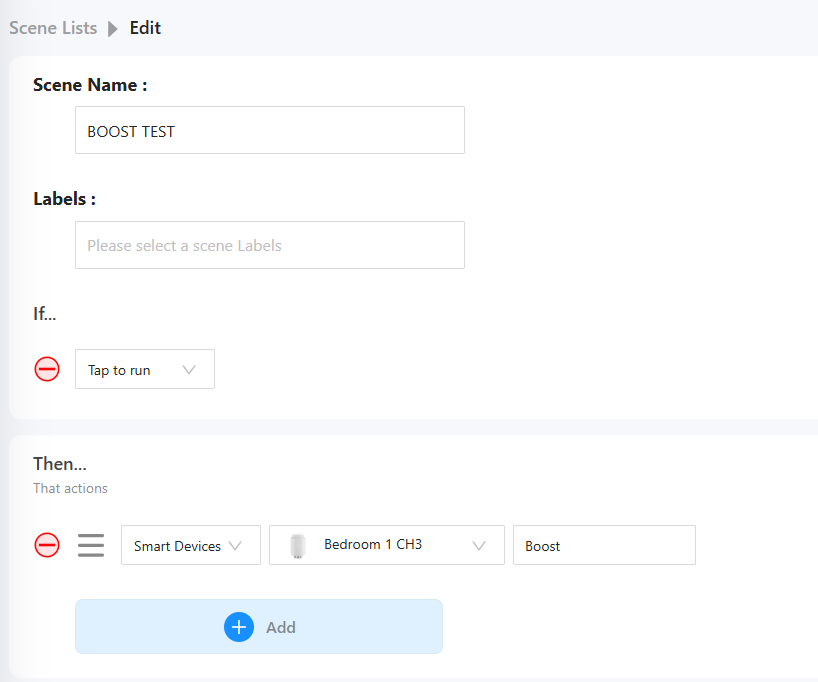
There seems to be a bug associated with eWeLink CUBE vV2.8.0/ TRVZB v1.4.0: For iHost Automatic and Manual Tap To Run Scenes if ‘BOOST’ or ‘SCHEDULE’ for a TRVZB is set in the THEN statement the device does not switch into ‘BOOST’ or ‘SCHEDULE’ when the IF Statement is satisfied (Auto Scene) or the Scene is executed (Manual Tap to run Scene) but ‘Success’ is displayed. Auto, Manual and OFF (Frost Protection) Thermostat modes are not affected. In the attached simple test manual scene if it is executed it will show ‘Success’ but the TRVZB does not switch to ‘Boost’ Reported via iHost Feedback with ticket ID256850
Update: From a scene the TRVZB does actually go into ‘Heating’ status but the displayed target temperature does not change to 35 deg C. The mode (Auto/ Manual/ OFF) does not change and the ‘Boost’ toggle switch does not flip over to the ON position.
There are bugs associated with setting ‘Boost’ and ‘Schedule’ Thermostat modes from Automatic and Manual Tap to run scenes which means that the only way that Boost or Schedule can be initiated is from the TRVZB device card on iHost Main Screen.
Exactly, this is a result of the 2.8 update in which the iHost has lost the ability to pass them in the Matter bridge. In my case they are 4 of the same type of Zigbee device, a small and very useful motion sensor which is sold as eWelink compatible.
More importantly I see now that any virtual device created (switch, contact etc) in the Node-red add-on will no longer show in the Matter bridge. On the iHost they are now shown as :
*The following devices are not supported to be added to Matter-supported platforms yet.
I have created before virtual devices in this way and they are still running correctly.
I also have had this for some time on earlier releases of eWeLink cube. Leave iHost on and this will eventually cease. I reported this to Sonoff via IHost feedback a while back but the ticket is still unresolved.
Just to update this:- when ‘Boost’ is initiated from a scene the TRVZB will actually go into ‘Heating’ status but the displayed target temperature will not change to 35 deg C, The mode (Auto/ Manual/ OFF) will not change and the ‘Boost’ switch toggle indicator will not move over to the right.
After the Moes TS0601 thermostat replacement, the Moes BHT series thermostat is not working properly. The temperatures on this thermostat are displayed in whole numbers and do not use a floating-point number. If possible, please replace it, as this affects temperature selection, device selection, and cube cast functionality.
I don’t know if I’m the only one experiencing this, but there has been an existing bug in eWeLink CUBE 2.7.0 that has been carried forward to eWeLink CUBE 2.8.0: Whereby, if you restart iHost, the set scenes won’t execute until you disable and re-enable them.
Could you provide a specific image or video to illustrate the issue? Alternatively, you can upload the problem description and system log through the feedback and share the corresponding ticket number with us. We will follow up as quickly as possible.
Could you provide a specific image or video to illustrate the issue?
Alternatively, you can upload the problem description and system log through the feedback and share the corresponding ticket number with us. We will follow up as quickly as possible.

 【Release Note】eWeLink CUBE on iHost Version History
 2025_11_12 1762970903502.tar.gz