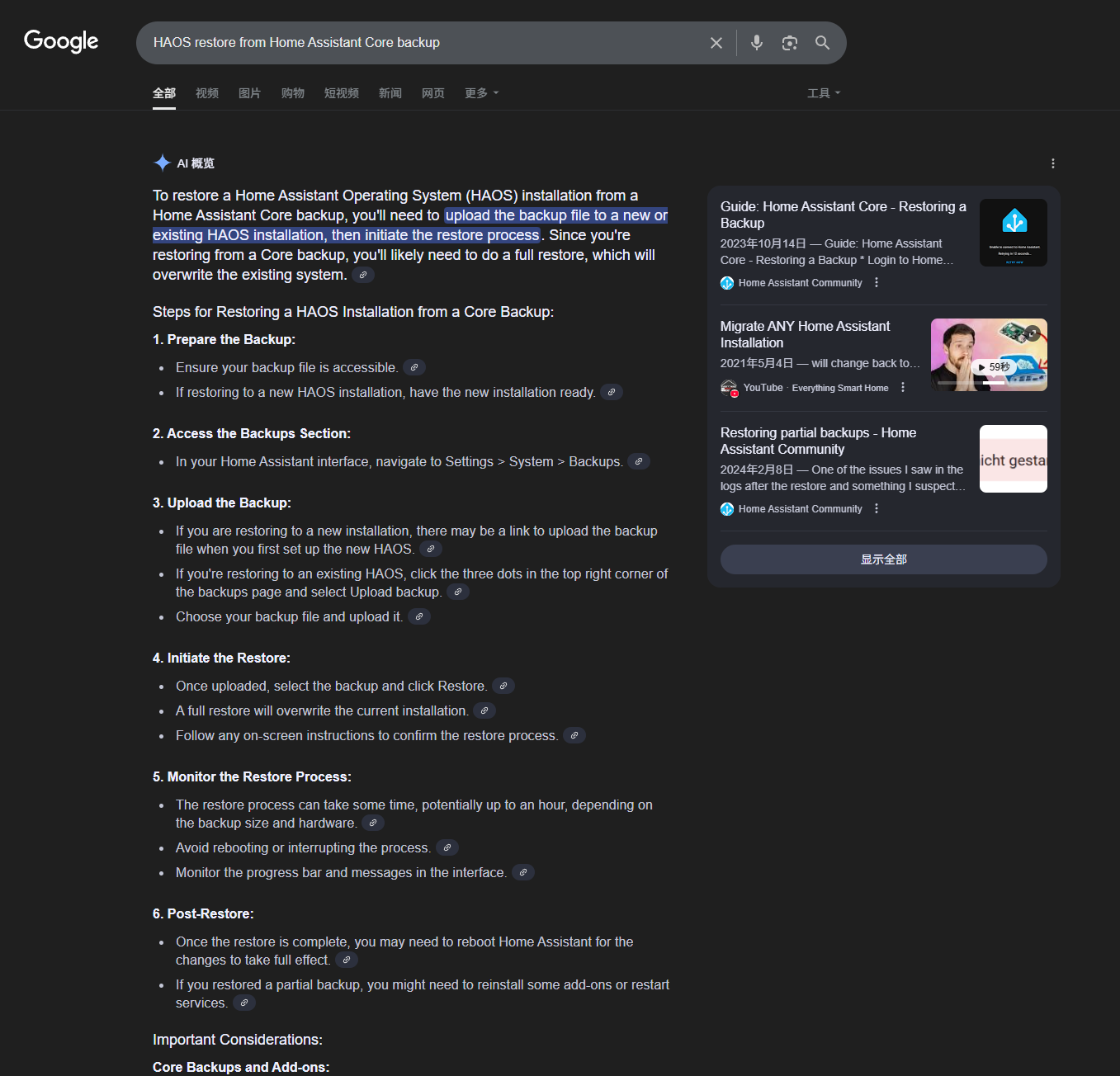
I currently have HA installed in docker on iHost. Will I be able to backup this version and then install HA over iHost and restore the backup I made in docker? or restore to raspberry pi?
Hi, the essense of the question is whether Home Assistant OS could restore from a backup of Home Assisant Core. It’s not specific to HA over iHost.
I just googled it, and it seems very easy. So please give it a try.

1 Like
Thanks for your update. We will submit a PR to implement the Detach Relay feature for ZBM5 in this month. I believe this feature will be available very soon.
1 Like
Pperhaps I did not understand the actual issue. I havea few

ZBMINIR2 and they seem to work., so far no problems encountered
Sonoff BASICZBR3 is showing wrong options on HA automation:
Thanks for your feedback.
MegaGio94 reported that the issue is caused by ZHA rather than the quirk issue.
I think it would be more appropriate for HA’s team to solve it.
My HA over iHost is working great. I look forward to the 64 bit version - hopefully later this year. Is there any way that we can get the current version to recognize/pass through a device to HA that is plugged into the USB port? I have a device that sends key codes via “keyboard_remote_command_received” to perform actions. If I use lsusb in a terminal, the device is there, but when I check my hardware in HA over iHost, (Settings, system, all hardware) the only event that show is event 0, /dev/input/event0, pwrkey. There are no other events. Got any ideas? Thanks.
@tom517 Could you describe in detail what functionality you’d like to achieve?
My current understanding is: you have a USB external device, you’ve connected it to HA_OVER_iHost, and you’d like HA to capture events when you press a button on that device, so you can use those events as triggers for automations. Is that correct?
If not, please explain your needs in more detail.
If that is correct, could you share the brand and model of your USB device? Also, have you ever used this device in other environments (for example, Home Assistant OS on a Raspberry Pi)? Were you able to capture key events there successfully?
You understanding is correct. The USB device is a 2.4 GHz wireless numeric keypad. I have tried four different (Chinese manufactured) models and brands without success. One of them is the “PINKCAT KF30”, but there are others.
Home Assistant is watching for the event “keyboard_remote_command_received”. Seeing a particular event, it will interact with or trigger an automation or operate a device. I have been able to successfully test this in any installations I have tried on “bare metal” installations. It also works properly in VMs using VirtualBox and VMware. I use Home Assistant OS in all installations.
Thanks for your reply. Hopefully, I’ve provided you with the information you need.
@tom517 Thanks for the extra details! The reason your keypad isn’t showing up in HA on iHost is simply that the kernel was missing a driver for generic USB HID devices. Without that driver, the dongle shows up in lsusb, but it never creates an input device under /dev/input/, so HA has nothing to listen to and no keyboard_remote_command_received events appear.
We’ve already tested that once this generic HID driver is enabled, regular USB keyboards (like Logitech and IKBC) work fine. That means your 2.4 GHz wireless keypad should also be picked up once the driver is in place.
Thanks for the explanation.
I am assuming that the driver is missing from the iHost version of HA since the dongle works in all other iterations of HA. Is this driver something that will be enabled or added (back in) or is it something that I can do?
Thanks again for the speedy explanation.
Thank you for your valuable information, which will help improve the HA functionality on iHost.
We will release HAOS 16.2 this week, which will include the HID driver. After updating to version 16.2, you will be able to use a 2.4G wireless keyboard. Refer to the official tutorialfor usage.
Thank you!
Version16.2 works perfectly!
Thanks again for being so attentive.
Please, add the light level and a more customizable detection level for SNZB-06P on Home Assistan (ZHA):
Hi, thank you for joining the eWeLink forum.
First of all, I have to say this section of eWeLink forum is mainly focused on running 3rd-party OS like Home Assistant OS on iHost hardware. So the integration issues of SONOFF SNZB-06P with ZHA is not related.
Secondly, from what I know, the issues you raised are not integration issues, they are the compability limits of SONOFF SNZB-06P itself. I mean, the SNZB-06P firmware doesn’t report accurate illuminance (lux) and doesn’t support setting of exact detection distance.
I fully understand your pain. I have the experience of false triggering when I walk past my bathroom. SNZB-06P is installed in my bathroom which is intended to turn on the bathroom light and fan automatically when I am IN the bathroom, NOT passing the bathroom.
Anyway, @Daniel_Zhan is SONOFF’s manger who pays attention to these user feedbacks and requests. I’ll make sure he knows this.
1 Like
From what I’ve noticed, it seems like the 5.8GHz microwave signal is bouncing everywhere, and the radar picks it up once it’s triggered, even when I’m behind the SNZB-06P.
Does it still.bounces even under reduced sensitivity settings? Interesting, because I have never experienced such a challenge
1 Like
