Hello
Does anybody know how to use own pictures storage in device (tablet) cache as a custom dashboard in CAST?
Hi! Currently, CAST supports setting a custom background image only via a URL. You can upload your image to a hosting service or cloud storage that provides a direct image link, and paste that URL here.

I don`t have any hosting service nor cloud storage but would like to use my own pictures as a background
Maybe someone from eWeLink will consider this option in the near future…?
I’ve forwarded this request to the CAST team for further evaluation 
1 Like
Thank You…
I think there are many people who don’t want to post their photos over the internet
You can host it yourself within your LAN. All you need is a small web server. Perhaps you have a NAS at home, a router with a USB port, or perhaps a device running CAST could host this file.
However, I don’t know if CAST(app) copies this file through eWeLink servers or just loads it directly from the URL.
Hello
I would like to put on cast dashboard a link to www or pdf file to make this open when clicked
It is not working… looks like just a simple text… any ideas how to make this work as a link?

You could experiment with iframes. I’m not sure if you’ll be able to fully load the PDF.

Here is an example with jpg display…

<iframe name="myiFrame" width="626px" height="626px" src="https://img.freepik.com/free-vector/simple-vibing-cat-square-meme_742173-4493.jpg" scrolling="no" marginwidth="0" marginheight="0" style="border:none;"></iframe>
But I guess CAST doesn’t allow for large embeddings and doesn’t respond to the frame size.
The difference between JPG and PDF is that if you provide a direct URL to the PDF, the browser will likely attempt to display the file, which could lead to security issues and URL failure.
In this case, you’d have to load a regular page with a simple HTML link that would open a new window/tab with the target PDF address.
Thanks.. I will try later this week and let You know…
In the meanwhile I have noticed another 2 bugs…
- The main screen on cast doesn’t have the same wallpaper as other screens.
How can I set the main wallpaper for cast?


-
Cast doesn’t show all data. I have set 3 TRVZB but only 2 are visible


Can You help with that?
I don’t think it’s possible to set a background for the first screen where you select a specific CAST.
Backgrounds seem to only be per CAST.
I don’t work for eWeLink, so I can’t help with bugs. Perhaps someone from eWeLink will chime in.
You can try adding it again, change the position and size, maybe the third one will appear.
I tried to delete cast “ogrzewanie” and make it again from the begining…
I tried to remove from one place to another but nothing is working…
Looks like “grzejnik sypialnia” can’t be added
@eWeLink Staff- please take a closer look to this bug
Only small tile can be added
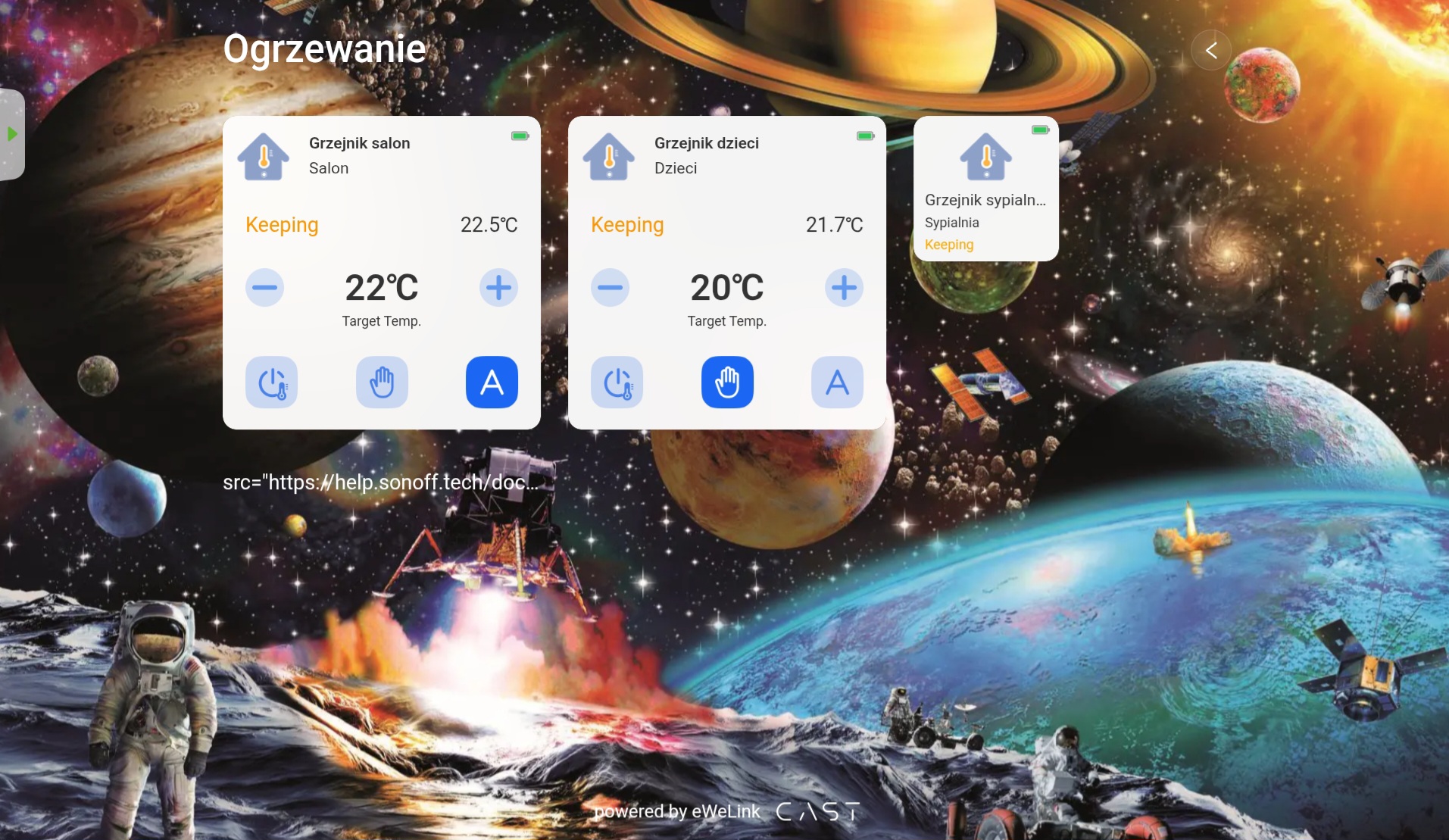
I`m sorry but it doesn`t work as I expected…
Looks like “iframe” puts in the defined by size window connected www page… but it is not possible to use it this way…
Moreover widow size: width and height does not work… It has always the same size as a bigger tile
What I would like to achieve is that after clicking on the displayed text (link) a new browser window would open with the content of the page

Yes, the size is predefined on the CAST/ewelink side and, as I mentioned, it can’t be changed.
We probably won’t change much here. It’s implemented that way on their side. The frame was originally introduced only for adding YouTube videos, and other uses are simply a side effect.
If you need the freedom of HTML, consider creating your own page, even a simple index.html, and hosting it locally. Then, as a large frame, you’ll add the CAST to the whole thing, rather than the other way around. 
In other words, try creating your own test-url.html that will be available online on some server.
In it, simple HTML code with a URL link and a variable to open a new tab.
You can of course expand the test-url.html file with colors or background to make it more compatible with CAST, but don’t expect a perfect fit in appearance.
So, test-url.html with content like this:

Then load the test-url.html address in a CAST frame… theoretically, it should work.

This way, you’ll theoretically achieve what you want. Although it won’t be super pretty because the frame can’t resize, you’ll still have some short text from the URL. After clicking which it should open a new tab.
(test-host.pl is just a fictitious example.)
Thank you for your help.
Unfortunately, I don’t have access to any server and I don’t plan to.
I thought the text field would allow me to paste a link to HTML page and use it in a browser window. I’m a bit puzzled why the text field was even introduced… why would anyone need to display text on the CAST screen? and regarding YouTube video I also find it incomprehensible. Why embed it? How many times can you watch the same video? 
In my opinion, it’s better to be able to insert a link (will be more flexible) for example to a technical data sheet for Sonoff products  or external pdf file
Let`a leave it this way… maybe in the future eWeLink support will take care of this issue 
1 Like
I’m not sure about the design processes at ewelink.
Apparently, they designed it that way, or I’m not aware of any additional tricks that would allow for this.
Your decision not to have hosting. But you could even use free hosting for this… it’s just one HTML file.
