I apologize for the inconvenience. The issue of device names reverting to the default will be fixed in the version released during the second week of November.
2 Likes
Hi;
The device has received the 1.16 update. However, the TRVZB valve and external sensor connection problem persists. The sensor and valve connection are disconnected. Winter is approaching. Unfortunately, using it this way is not comfortable.
1 Like
Are you referring to the data from TRVZB not using the external temperature sensor? Or is it another issue? Could you provide a more detailed description or a screenshot for clarification?"

With V1.16.0 different external temperature temperature sensors (Snzb-02d) keep randomly disconnecting and reconnetting from the bridge even if close to ZBBridge-U. TRZVBs reverting to internal sensors. With V1.15.0 no disconnection problem.


2 Likes
Hi there ,
With the latest firmware, I tested a Tuya motion sensor that also includes a light sensor, but it was detected as a temperature sensor instead — and it doesn’t work.

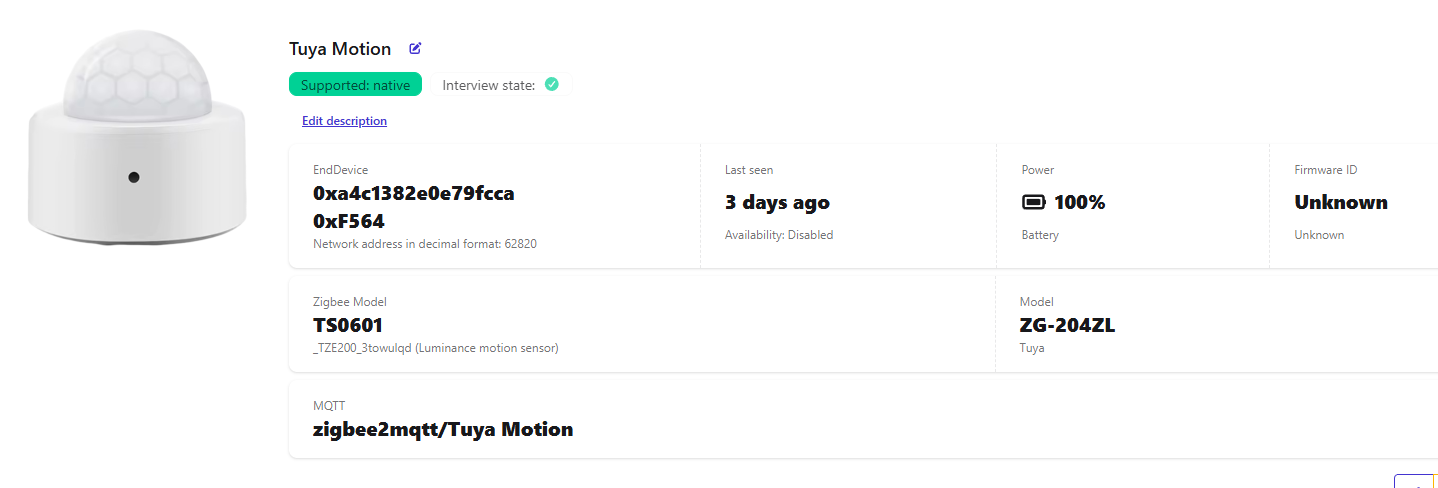
Based on the ZG-204ZL model you provided, we have confirmed that it should be recognized as a motion sensor. Please submit feedback and upload logs via the eWeLink App (you may refer to the steps in the link), so we can further investigate the issue.
31 random disconnections and reconnections yesterday (reverting to internal sensors). 29 up to now today…
1 Like
Are you experiencing the same issue?
Yes, continuous random disconnections and reconnections of each and every single Snzb-02d, whether they are distant or close to my ZBBridge-U. I have already opened a ticket and waiting for solution.
1 Like
Thanks for your feedback! Our developers are currently looking into the issue, and I’ll let you know as soon as there’s any update.
2 Likes
Meanwhile our rooms temperature is completely unstable  .
.
Please give us the possibility to downgrade our devices to temporarily solve this kind of problems while your developers can solve them. I’d try to downgrade my Zbbridge-u from V1.16.0 to V1.15.0. That would also be helpful for developers. A simple line in zbbridge-u options menu “downgrade”.
2 Likes
hi all , i got old new issue with zigbee bridge ultra which that often some end devices ( mostly door contact) appears offline unless i open or close manually , i checked batteries and were fine , but this behavior happens from time to time , the way to solve it is to remove the zigbee door contact and add again , but after few days to week it happens again
Support answer:
Thank you for bringing this to our attention. We understand how frustrating these frequent disconnections can be.
Our team has already identified the issue in Zigbee-U firmware v1.16.0, and we expect to release a new firmware version v1.17.0 in December to fix this problem.
Please keep an eye out for the update, and once it is available, upgrade your ZBBridge-U to see if the issue is resolved.
1 Like
Same here: since 1.15.0 update, all my devices are being disconnected multiples times per day. My whole system unusable. So far not answer from techsupport, appart from the standard “we are working on it”  .
.
1 Like
Sorry for the trouble. Could you let me know the exact issue you’re facing? (Specifically, I’d like to know the device information such as the manufacturer, model, and details of the problem.) I can check internally on the current diagnostic status and progress for you.
Can you tell me the manufacturer and model of your door sensor? Also, have you submitted feedback and uploaded logs in the app? This will help us better identify and analyze the specific cause.
Hi Yi,
I reported all logs of ZBridge-U from the eWelink on case #565518: I have 64 zigbee devices, all of them Sonoff. I have had the same setup working for years without a single disconnection. Since ZBridge Ultra fw 1.15.00 was pushed ALL devices (end devices and routers like ZBminis) are being disconnected randomly multiple times per day. I may have always between 5 to 15 devices disconnected.
I’ve downloaded the logs from the router myself and review all of them, and by selecting a random device, I can see up to 39 disconnections per day and more than 10 hours offline. The offline problems happens after two consecutive Zigbee ping timeouts; when this happen, I see on the logs that multiple devices fail within the same way in a 2 minutes window. And this 2 minutes window happens after EZSP stack error (cubec:ezsp: Frame changeSourceRouteHandler parsing error: RangeError [ERR_BUFFER_OUT_OF_BOUNDS] … Unparsed frame 0xc4.) which may indicate a frame error, that would brake the routing path causing multiple devices to be unreachable.
As of today, I cannot use any or relay on any of the zigbee devices in my home system.
From what you described, it looks like your Zigbee network structure is a bit complex, which might be causing some issues when the routing table is being built. I recommend power-cycling the gateway — this usually helps the network rebuild itself. You can also try using the channel scan feature to pick a better channel.
Also, our tech team is planning to update the MG21 firmware along with the related drivers, which should further improve how the network runs.