# Mistake in Scene and i cannot find it
**URL:** https://forum.ewelink.cc/t/mistake-in-scene-and-i-cannot-find-it/118303
**Category:** Free discussion
**Created:** [January 11, 2025, 2:48am UTC](https://forum.ewelink.cc/t/mistake-in-scene-and-i-cannot-find-it/118303 "2025-01-11T02:48:39Z")
**Posts on this page:** 3
**Page:** 1
### Author:  [@thomas1](https://forum.ewelink.cc/u/thomas1)
#### Post date: [January 11, 2025, 2:48am UTC](https://forum.ewelink.cc/t/mistake-in-scene-and-i-cannot-find-it/118303/1 "2025-01-11T02:48:39Z")
Good morning,
ewelink doesn’t know about brightness sensors, so I’m trying to do it using Tuya. In Tuya I have 2 scenes, if brightness then switch (Tuya) on or off. That works.
In the next step I use two processes in Google Home. If Tuya switch is on or off then Ewelink Switch on or off. That also works.
A scene in Ewelink, if movement then light on works. The same scene supplemented with the switch, i.e. if movement and switch on then light on, works unreliably. Then I tried it without the Ewelink switch, created manual scenes which activate or deactivate the scene (if movement then light). I start this scene via Google instead of the switch. It runs, the scene (if movement then light) is correctly displayed as activated or deactivated.
But regardless of this status the light is switched on or not. It seems random.
Where is my mistake?
---
### Author:  [@spoustaml](https://forum.ewelink.cc/u/spoustaml)
#### Post date: [January 11, 2025, 2:27pm UTC](https://forum.ewelink.cc/t/mistake-in-scene-and-i-cannot-find-it/118303/2 "2025-01-11T14:27:52Z")
can you take some screenshots? It is not clear from the description exactly what you mean.
---
### Author:  [@thomas1](https://forum.ewelink.cc/u/thomas1)
#### Post date: [January 11, 2025, 3:42pm UTC](https://forum.ewelink.cc/t/mistake-in-scene-and-i-cannot-find-it/118303/3 "2025-01-11T15:42:56Z")
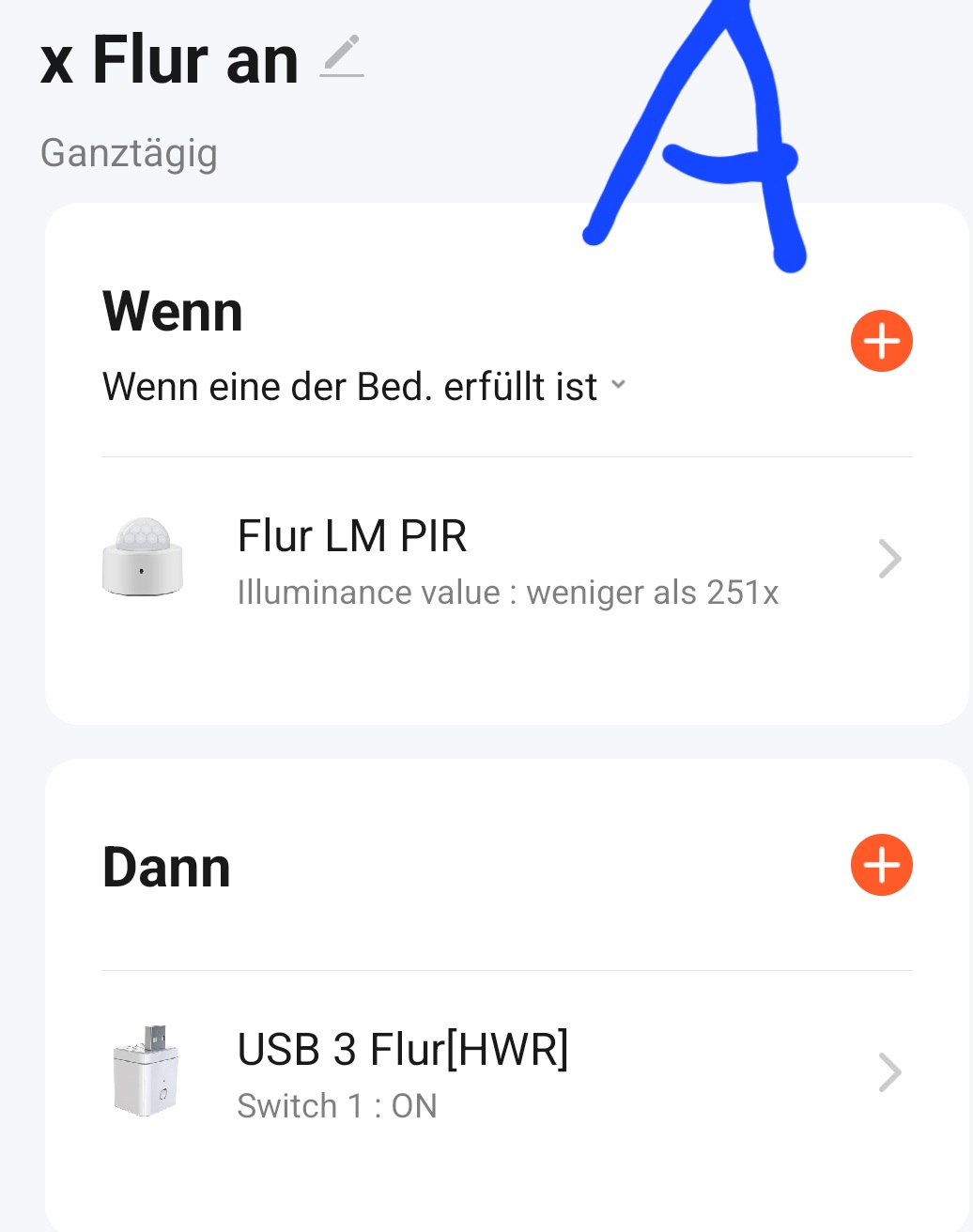
Of course, as I said, I’m looking for a way to have the motion detectors active only in the dark.
So (A) Tuya light sensor switches on Tuya switch. (B) Google Home when Tuya is on then Ewelink (Frei1) on and activate scene (C).
Everything works up to this point.
Nevertheless, the scene (D) is only executed unreliably and is not in the log. I have the feeling that the scene is shown as activated, but it is not.
(E) shows the action when movement is detected,
Frei1 is a normal wall switch that I use for control and also to manually override the automatic function